From a VBA Workbook to a Python Tool Suite
How a handful of small automations grew, one bottleneck at a time, into a desktop suite of eight tools that search, convert, reconcile, and report on CRM data.
- status shipped
- version v21
- built Sep 2026
- suite 8 tools
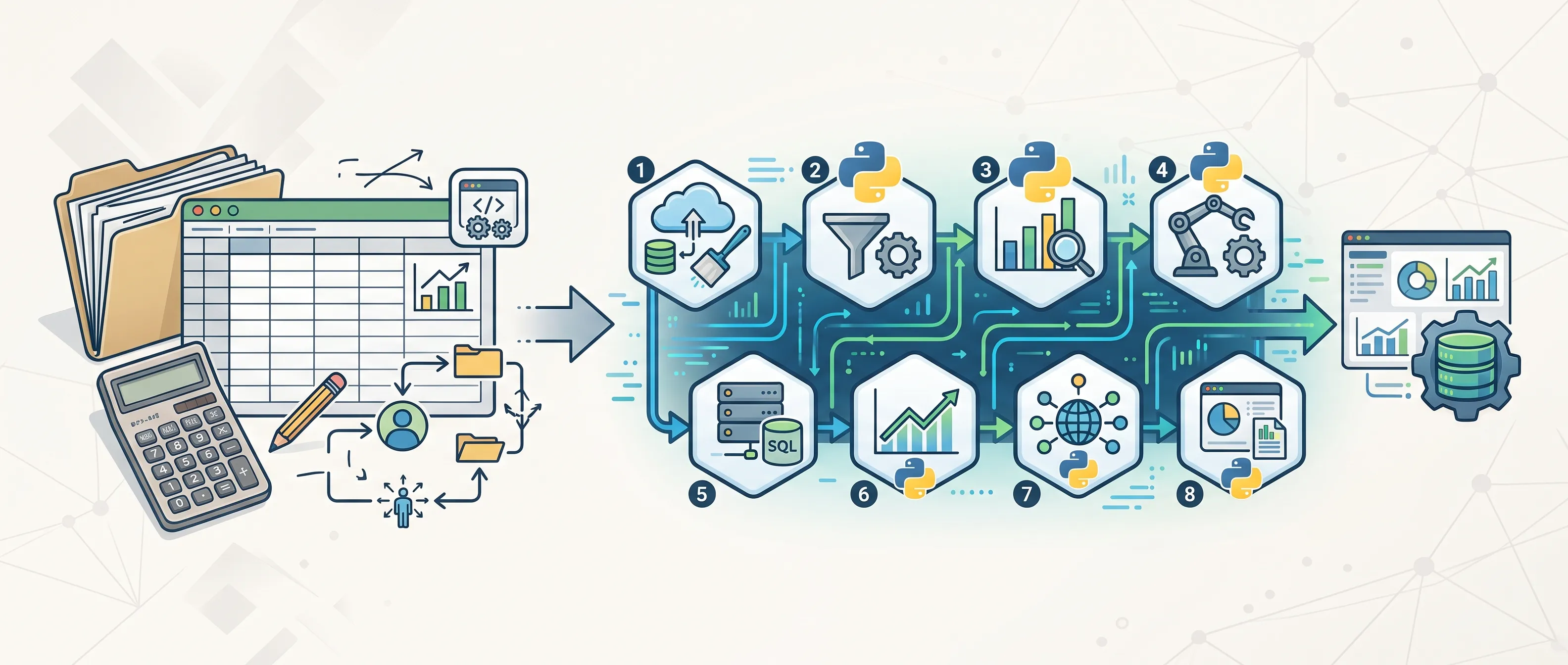
- 8 purpose-built tools in one launcher
- 300K+ CRM records processed by the pipelines
- 15–20 min for recurring tasks that took 1–2 hours
How it evolved
- Stage 1 Excel as the database Monthly compilation and reporting by formula
- Stage 2 A VBA workbook Macros for the repetitive steps
- Stage 3 Standalone Python tools One desktop app per bottleneck
- Stage 4 One tool suite Eight tools, one launcher, shared rules
A large lead database has to keep moving between several systems: an operations CRM where the calling happens every day, a main CRM that holds the cleaned master records, campaign spreadsheets, an email marketing platform, and an email validation service. Data flows out to start a campaign and flows back when the results come in.
When I started, almost every step of that loop was manual. Export, clean, reformat, match, import, repeat. Each step was simple on its own, but together they took hours, and small mistakes carried straight into the CRM: a misaligned column, a duplicate record, a phone number in the wrong format.
This is the story of how I automated that loop. Not in one big project, but in stages, each one fixing whatever was slowest at the time.
Stage 1: Excel as the database
The first version was a spreadsheet. Every month, records from six sources landed in one workbook, and formulas did the cleanup and reporting: company-name normalization, cross-source lookups, and a SUMIFS dashboard by source, year, and status.
It worked, but every month was rebuilt by hand, and the workbook got slower as the data grew. Turning Excel Into a CRM covers this stage in detail.
Stage 2: A VBA workbook
Next, I moved the repetitive steps into macros: converting exports between systems, preparing call logs, and validating data before import. That cut manual Excel processing time by 70 to 80%.
But one big macro workbook had limits. It was slow on large files, fragile when a column moved, and hard to hand over to anyone else.
Stage 3: Standalone Python tools
So I rebuilt the heaviest jobs in Python, one desktop app per job:
- a search and filter engine for 100K+ row exports (1 to 3 hours of manual filtering down to under 10 seconds)
- a CRM conversion engine that turns any source file into a clean import (around 40K records in about 18 seconds)
- a call analytics tool that matches call logs to CRM records (about 60 minutes down to under 15 seconds)
- a pivot report tool for recurring breakdowns (20 to 30 minutes down to under 20 seconds)
Each one was a big win. Together, they created a new problem: every app had its own copy of the business rules. When a CRM field changed, I had to change it in several places and hope I didn’t miss one.
Stage 4: One suite
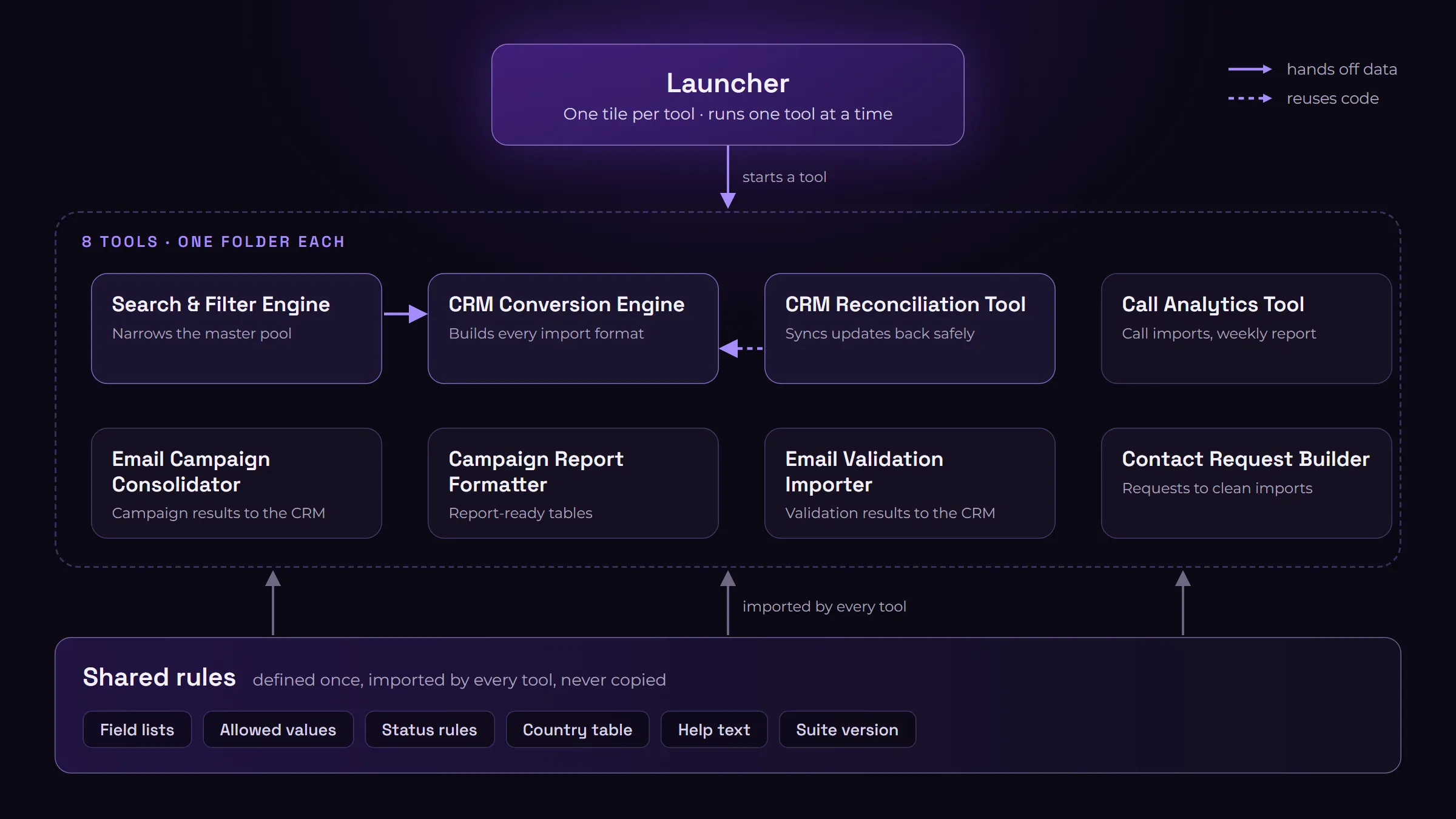
The current version is a single launcher that opens eight purpose-built tools. The launcher does no data work itself. It shows one tile per tool, starts the selected tool, and steps aside until it closes.
What made the difference was a few design rules I now apply to everything I build:
- One tool, one folder. Each tool owns its interface, logic, tests, and help text, so I can upgrade one without touching the others.
- Rules are defined once. Field lists, allowed values, status rules, and the country table live in one shared module. Tools import them; nothing gets copied.
- Logic is separate from the interface. The data work lives in plain pandas modules. The window only collects inputs and shows results, which means every pipeline can also run as a script and be unit-tested.
- Reuse, don’t rebuild. When the reconciliation tool needed the same output format as the conversion engine, it imported the engine’s transformer instead of recreating it.
- The main CRM is the source of truth. Tools can read the fields it owns for matching, but never write them.
- Stop bad files before import. If an output would break a rule, the tool refuses to produce it.
Every release runs validation checks and every tool’s tests first. The suite ships as one folder with its own Python runtime, so anyone can run it without installing anything.
What the suite does
| Tool | What it does |
|---|---|
| Search & Filter Engine | Narrows a large lead dataset to a campaign’s target list, with bulk company and job-title matching |
| CRM Conversion Engine | Converts files from any source into each system’s import format, with identity matching |
| CRM Reconciliation Tool | Compares updated records against the master database and splits safe changes into separate import files |
| Call Analytics Tool | Turns raw call logs into CRM call imports and a weekly operations report |
| Email Campaign Consolidator | Combines email campaign reports into CRM-ready imports and a summary report |
| Campaign Report Formatter | Turns a raw CRM export into each campaign’s report table |
| Email Validation Importer | Turns validation results into one clean CRM update file |
| Contact Request Builder | Turns a free-text contact request into one clean import |
Results
- Automated pipelines now process 300,000+ CRM records, cutting recurring tasks from 1 to 2 hours to 15 to 20 minutes.
- Moving from spreadsheet workflows to the CRM cut manual data handling by roughly 60%.
- The suite is documented end to end, with in-app help in every tool, so a new user can follow the same procedure without a verbal handover.
What I learned
Automation is never finished. The tools changed as often as the CRMs and processes did. I have also retired two tools once a better approach existed, which turned out to be as important as building new ones.
Shared rules beat copy-paste. The move from standalone apps to one suite wasn’t about features. It was about making every tool agree on the same rules, so a change happens in one place.
Guardrails matter more than speed. The most valuable feature isn’t how fast a tool runs. It’s that it won’t produce a file that would quietly damage the database.
AI speeds up the building, not the thinking. I built much of this with AI-assisted coding, but the structure, the rules, and the checks still came from understanding the data and the people using the tools.